Install
Run on a fresh or existing Ubuntu desktop. Sudo is required for apt packages and hardening restore. The project is free — you only need Git and a network connection.
Quick start
git clone https://github.com/sk1tzwzd/ubuntu-x47-build.git
cd ubuntu-x47-build
chmod +x install.sh snapshot.sh modules/*.sh
./install.sh
Optional amnesia user (Tor-forced anon):
./install.sh --with-amnesia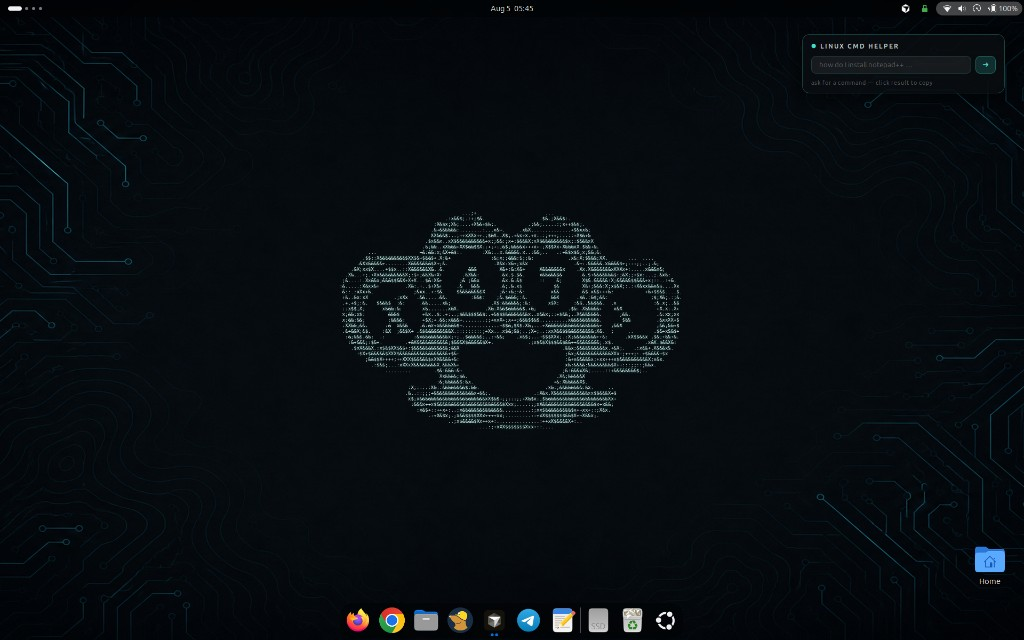
Install from ISO
Prefer a fresh machine? Grab the ISO from the
latest release
— official Ubuntu 26.04 desktop remastered with the X47 scripts.
Choose Install X47 Ubuntu 26.04 in the boot menu. Language,
disk, username, and password stay interactive (you create your own
account). Nothing from the maintainer’s home directory is on the
image — only a git archive of this repo under
/opt/ubuntu-x47-build. First login opens the setup terminal.
GitHub limits release files to 2 GB, so the ISO comes in parts.
Download every .part file plus SHA256SUMS
from the release, then:
cat x47-ubuntu-26.04-desktop-amd64.iso.*.part > x47-ubuntu-26.04-desktop-amd64.iso
sha256sum -c SHA256SUMS --ignore-missing
Flash it to a USB stick (GNOME Disks, balenaEtcher, or
dd) and boot. You can also build the ISO yourself with
scripts/build-iso.sh (needs xorriso, no root).
Flags
| Flag | Effect |
|---|---|
--user-only | Skip apt + hardening; terminal, tools, icons, launchers only |
--skip-apt | Skip third-party repos and apt packages |
--skip-hardening | Skip UFW / fail2ban / sysctl / auditd restore |
--skip-debloat | Keep language packs and default desktop apps (no trimming) |
--skip-perf | Skip boot/service perf tweaks and the Firefox snap→deb swap |
--skip-desktop-fx | Skip bottom dock + 3D window/desktop effects |
--skip-putty-clipboard | Disable PuTTY-style WezTerm clipboard (select copy / right-click paste / Ctrl+C·V) |
--skip-win-screenshot | Do not bind Super+Shift+S (Print still works) |
--with-amnesia | Create the amnesiac Tor-forced anon user |
--only 10-terminal,30-icons | Run a subset of modules |
PuTTY clipboard and Super+Shift+S default on. Change them anytime from the
X47 Settings app, or run x47-settings /
x47-settings set putty_clipboard off.
What gets installed
- Terminal — WezTerm AppImage (wide window + watermark); GNOME Terminal removed
- Privacy — Mullvad VPN (apt), Tor Browser (latest from Tor Project)
- Tools — nmap, Metasploit, wireshark, hashcat, Go recon suite, pipx AD tools, cargo utilities, release binaries
- Icons & launchers — kali-* pack, custom cool icons, x47duster fallback (no Kali dragon)
- Hardening — files under
config/restored to/etc
Performance / debloat
Runs by default (opt out with --skip-debloat). Core desktop
and session packages and the pentest/dev toolchain are never touched, and
every removal is reversible with sudo apt-get install <pkg>.
- Language packs — removes non-English
language-pack-*, LibreOffice l10n, and non-enspell dictionaries - Default apps — GNOME Terminal, GNOME games, Rhythmbox, Cheese, Thunderbird, LibreOffice, Transmission, Remmina, Shotwell, Maps/Weather/Contacts/Todo, Simple Scan, Totem, GNOME Music/Photos, Ubuntu Help
- Snap bloat — App Centre (
snap-store) and Desktop Security Centre (keeps firmware-updater) - Cleanup —
apt autoremove --purge, cache clean, journal vacuum to 200M, thumbnail cache - Tweaks —
fstrim.timer,zram-configcompressed swap,vm.swappiness=10, file indexer (tracker/localsearch) masked
Boot / runtime performance
Runs by default (opt out with --skip-perf). Trims boot
time and idle resource use; every step is reversible and prints how
to undo it.
- Pentest tools off the boot path —
chkrootkitandbettercapare kept but no longer run as boot services (they were adding ~60s of boot I/O) - Faster GRUB — menu timeout cut to 1s and hidden
- ModemManager masked — no cellular modem, so no serial-port probe stalls
- ClamAV on-demand — resident daemon stopped (frees ~1 GB RAM); scan with
clamscan -r - kdump-tools + cloud-init disabled — frees reserved RAM and install-time-only services
- Printing/discovery off —
cups,cups-browsed,avahi(re-enable if you print)
scripts/firefox-restore-snap.sh restores the
snap and your profile.
Desktop looks
Runs by default for the main user (opt out with --skip-desktop-fx).
User-level only; on Wayland, log out and back in once so the effects load.
- Bottom dock — Ubuntu Dock moved to the bottom, always visible; hides in F11 fullscreen
- 3D window switcher — Coverflow Alt-Tab, bound to window and application switching
- Rotating desktops — Desktop Cube (workspaces fixed at 4)
- Window animations — Burn My Windows: TV Glitch on open, Broken Glass on close
- Blur + wobble — Blur My Shell (panel/overview/dash) and Compiz-style wobbly windows
- Hover-only window controls — minimize/maximize/close stay invisible until you hover the titlebar (GTK3 + GTK4 apps, including snap Firefox)
- X47 wallpaper — the X47 knuckle-duster as glowing teal ASCII art, centered over a dark circuit background, set for light and dark modes
- Linux CMD Helper widget — ask in plain English, get just the Ubuntu terminal command (Anthropic Claude Haiku; key in
~/.config/x47-widgets/anthropic.keyorX47_ANTHROPIC_KEY). Above desktop icons, under app windows, hides in fullscreen, snaps to grid, click to copy
Firefox hardening
A system-wide enterprise policy is installed to
/etc/firefox/policies/policies.json (honored by the Firefox
snap and deb).
- Main browser — telemetry, studies, Pocket and sponsored content off; tracking protection with cryptomining + fingerprinting blocking; HTTPS-only; DNS-over-HTTPS; no prefetch. JavaScript stays on. Also forced as the default browser (replaces Chrome).
- Anon browser — stays Tor Browser "Safest": JavaScript off, no SOCKS proxy (transparent Tor), and DoH hard-off (
network.trr.mode=5) so DNS cannot bypass Tor.
Updating Cursor
Cursor is installed from the official apt repo. Prefer:
update-cursor
# or: sudo apt update && sudo apt install --only-upgrade cursor
If the Cursor GUI says an update is available but apt says you already
have the newest version, that is a known Cursor lag (in-app feed vs
apt repo) — not caused by this build. Silence the nag with
update-cursor --quiet-gui.
Source
Repository:
github.com/sk1tzwzd/ubuntu-x47-build
Docs site (this page):
sk1tzwzd.github.io/ubuntu-x47-build